
However, protecting original images can support a broader content and brand strategy.Protect Your Website Images With Copyright/
Original visual content can help your website:
- Provide a better user experience
- Demonstrate expertise and originality
- Support product and service pages
- Improve visual search opportunities when properly optimized
- Strengthen brand recognition
- Make content more useful and distinctive
Good SEO is about much more than one technical trick. Search engines evaluate many signals related to content quality, relevance, usability, and overall website experience.
Protect Your Website Images With Copyright
The purpose of a practical image-copyright lesson is not simply to explain the concept. It should also show website owners what they can actually do.
Here are some useful steps.
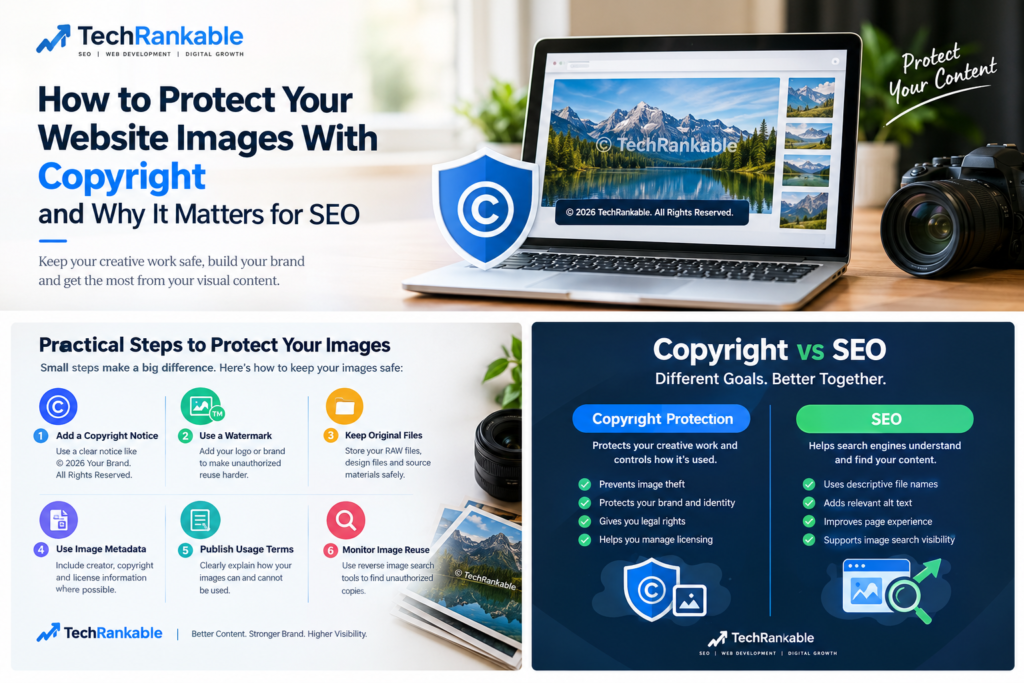
1. Add a Copyright Notice
A simple copyright notice can communicate that your images are protected.
For example:
© 2026 TechRankable. All Rights Reserved.
A notice is not a magic technical barrier, but it clearly communicates your claim of ownership.
2. Add Your Brand or Watermark
A watermark can make unauthorized reuse more difficult and can identify the original creator.
For example, photographers and businesses may place a subtle brand name or logo over their images.
The watermark should be designed carefully so that it protects the image without making the image unpleasant for legitimate visitors.
3. Keep Original Files
Keep your original photographs, design files, RAW files, project files, and other source materials.
These records can be useful for demonstrating that you created an image if an ownership dispute occurs.
4. Use Image Metadata
Depending on the type of image and workflow, metadata can contain information about the creator, copyright holder, licensing information, and other details.
Metadata should not be treated as a complete protection system because it can sometimes be removed or changed.
5. Publish Clear Usage Terms
If you allow people to use your images under certain conditions, clearly explain those conditions.
For example:
Images may not be reproduced or commercially used without written permission.
For more complicated licensing arrangements, professional legal advice is worthwhile.
6. Monitor Where Your Images Appear
Regularly checking whether your original images are being reused can help you identify unauthorized copies.
Reverse image-search services can sometimes help discover where an image or similar version appears online.
What About Disabling Right-Click?
Some website owners disable right-clicking to make downloading images less convenient.
This can discourage casual copying, but it does not provide real copyright protection.
A technically experienced visitor can often obtain an image through browser tools, cached resources, screenshots, or other methods.
Therefore, right-click protection should be viewed as a small deterrent rather than a complete security solution.
Copyright and Website Images: Don’t Confuse Protection With SEO
This is one of the most important lessons.
Copyright protection and SEO have different purposes.
Copyright protection focuses primarily on protecting creative work and controlling its use.
SEO focuses on helping search engines understand and discover useful content and helping users find it through search.
They can work together, but they are not the same thing.
For example, properly optimized images may use:
- Descriptive filenames
- Appropriate alternative text
- Relevant surrounding content
- Proper image dimensions
- Modern image formats where appropriate
- Good compression
- Responsive images
- Fast loading techniques
These practices can contribute to a better website experience and image-search visibility.
Why Are Lessons Divided Into Part 1 and Part 2?
Complex website and SEO topics are often divided into multiple parts because one lesson cannot always cover everything effectively.
Part 1 can introduce the basic concepts.
Part 2 can provide additional details, examples, and practical steps.
This approach makes educational content easier to follow and allows the reader to learn progressively instead of receiving one very long and confusing lesson.
For example:
Part 1 — Understanding Image Copyright
- What copyright means
- Why image ownership matters
- Common types of image theft
- Copyright basics
Part 2 — Practical Image Protection
- Copyright notices
- Watermarks
- Metadata
- Usage policies
- Monitoring image reuse
- Practical website protection
Splitting a topic into parts does not necessarily mean the information is incomplete. Often, it allows the subject to be explained in greater detail and with more practical guidance.
Common Mistakes Website Owners Make
Many businesses make simple mistakes when publishing images online.
Using Images From Google
Finding an image through Google does not mean that the image is free to use.
Google is a search engine, not a universal image-licensing service.
Assuming “No Copyright” Means Anything Goes
Some images are available under specific licenses that require attribution or impose other conditions.
Always check the actual license before using an image commercially.
Uploading Large Original Images
Large, unoptimized images can slow down a website.
Copyright protection should not come at the expense of website performance. Keep appropriate original files securely stored while using optimized versions on the website.
Thinking a Watermark Makes an Image Legally Invincible
A watermark can help identify ownership and discourage casual copying, but it does not replace copyright law or proper licensing.
A Better Approach for Businesses
A professional website should treat images as valuable digital assets.
A sensible workflow is:
Create → Record ownership → Optimize → Publish → Protect → Monitor
This approach works especially well for:
- Ecommerce stores
- Photographers
- Marketing agencies
- Manufacturers
- Product businesses
- Bloggers
- Designers
- Educational websites
- Personal brands
Final Thoughts
Website images are more than decoration. They can represent your brand, products, creativity, and investment in your online presence.
Copyright protection helps website owners establish and manage their rights over original visual content. At the same time, SEO requires properly optimized, useful, and relevant images rather than simply adding copyright notices.
The practical lesson is simple:
Protect your original images, use licensed content responsibly, optimize images for users and search engines, and keep good records of your creative work.
